The component worked. It looked right, the state was clean, and he was pleased with the custom dropdown he had built from a div and a click handler. Then the interviewer unplugged her mouse — metaphorically, but she said it out loud — and asked him to open it with a keyboard. He could not. Neither could roughly a billion people, which is approximately the point Microsoft was making.
Accessibility is the most reliably distinctive thing about Microsoft frontend interview questions. Microsoft ships software to enterprises and governments with hard accessibility obligations, so keyboard support and screen-reader semantics are treated as functional requirements rather than as a bonus round. The rest of the loop is broad and conversational — a fair coding bar with unusually deep follow-ups, a design round about large app surfaces, and a senior as-appropriate round bolted on at the end. I built Greenroom after freezing in an interview I had prepared hard for, so this guide covers each of those.
The Microsoft frontend engineer interview process
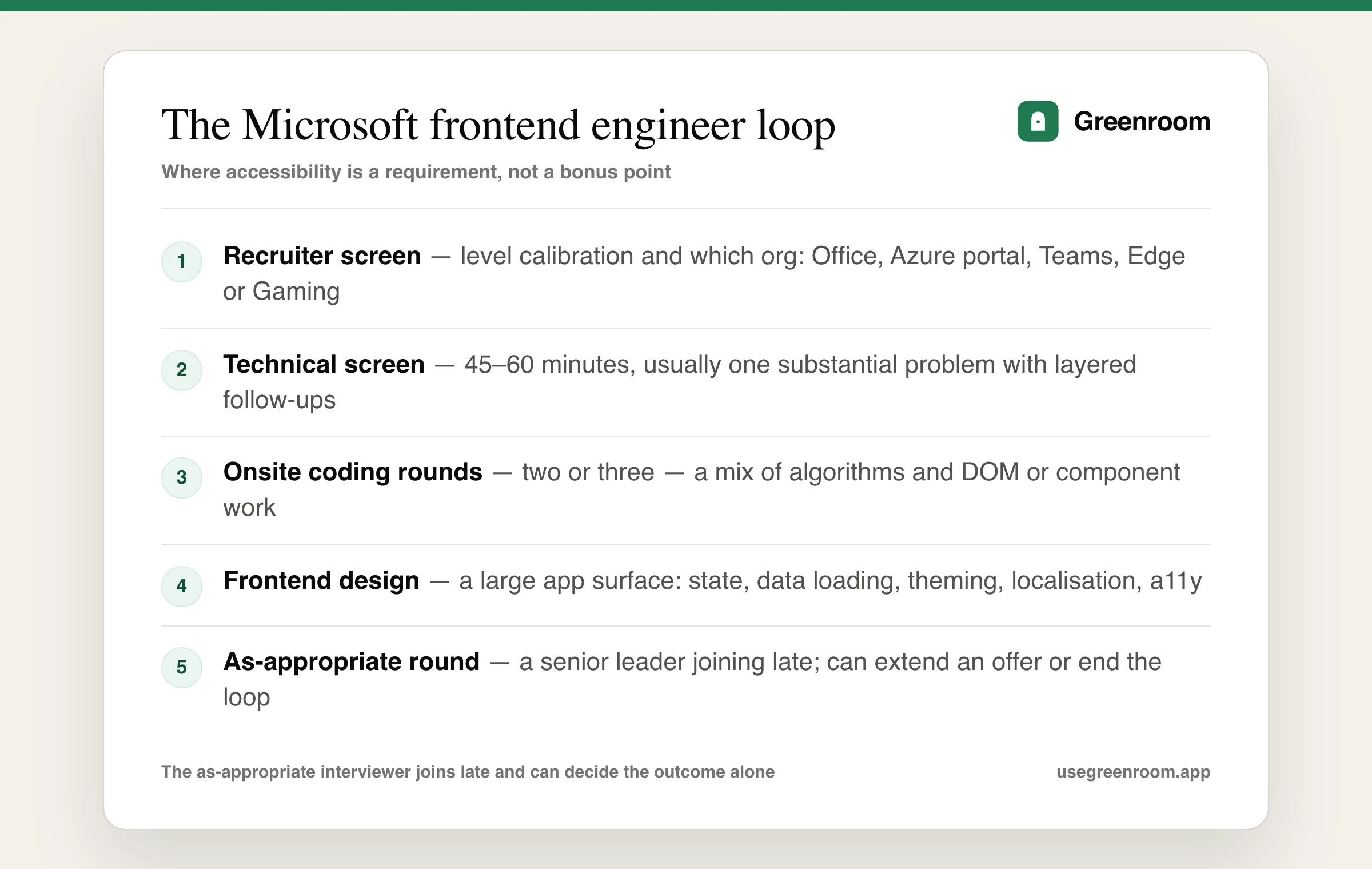
- Recruiter screen — level calibration and org matching. Office, the Azure portal, Teams, Edge and Gaming interview with genuinely different emphasis.
- Technical screen — 45 to 60 minutes, usually one substantial problem with layered follow-ups rather than two rushed ones.
- Onsite (virtual) — two or three coding rounds mixing algorithms with DOM and component work, plus a frontend design round.
- As-appropriate round — a senior interviewer added at the end, sometimes at short notice, who can approve or stop the loop alone.
- Debrief — the panel discusses you together, so consistency across rounds beats one dazzling answer.
Our Microsoft interview preparation guide covers the company-wide loop and the Microsoft backend engineer guide covers the services side.
The coding rounds: fair problems, deep follow-ups
Problems sit at LeetCode easy-to-medium — arrays, strings, hash maps, trees, two pointers. Frontend loops add DOM work: build a component, implement debounce, write a small event delegation system, or traverse and transform a DOM tree.
The differentiation is entirely in the follow-ups: what if there are ten thousand of these, what happens on a slow machine, is this accessible, how would you test it, what breaks in production. Answer those before being asked and the round changes character.
// build an accessible dropdown — the follow-up Microsoft always reaches for
function Select({ options, value, onChange }) {
  const [open, setOpen] = useState(false);
  const [active, setActive] = useState(0);

  function onKeyDown(e) {
    if (e.key === 'ArrowDown') setActive((i) => Math.min(i + 1, options.length - 1));
    else if (e.key === 'ArrowUp') setActive((i) => Math.max(i - 1, 0));
    else if (e.key === 'Enter') { onChange(options[active]); setOpen(false); }
    else if (e.key === 'Escape') setOpen(false);   // and return focus to the trigger
  }

  return (
    <div onKeyDown={onKeyDown}>
      <button aria-haspopup="listbox" aria-expanded={open} onClick={() => setOpen(!open)}>
        {value}
      </button>
      {open && (
        <ul role="listbox" aria-activedescendant={`opt-${active}`} tabIndex={-1}>
          {options.map((o, i) => (
            <li id={`opt-${i}`} key={o} role="option" aria-selected={i === active}>{o}</li>
          ))}
        </ul>
      )}
    </div>
  );
}
Then say the sentence that closes it: "the native select element gives all of this for free, so I would only build a custom one when the design genuinely requires it." Knowing when not to build is a senior signal. Our HTML and CSS interview questions guide covers the semantics underneath.
Accessibility, properly
Expect real questions, not a token one:
- Semantics before ARIA. The first rule of ARIA is not to use ARIA when a native element does the job. Saying this unprompted lands well.
- Keyboard paths. Tab order, focus trapping in a modal, returning focus when it closes, and skip links.
- Screen-reader behaviour for dynamic content. Live regions, and why a spinner with no announcement is invisible to a screen-reader user.
- Colour and contrast. WCAG AA ratios, and why colour alone must never carry meaning.
- Testing. Automated checks catch perhaps a third of issues; the rest need keyboard testing and an actual screen reader. Say that honestly.
Microsoft's own accessibility guidelines and the W3C's WAI-ARIA authoring practices are the reference sources, and interviewers there know both well.
TypeScript and frontend fundamentals
Microsoft wrote TypeScript, so surface knowledge is not a differentiator:
- Structural typing and why two unrelated types are assignable when their shapes match.
- Generics — writing a genuinely generic utility, and constraints with
extends. - Narrowing — discriminated unions, type guards, and why
asis usually a smell. - Utility types —
Partial,Pick,Omit,Record, and building one yourself. unknownversusanyand where each belongs at an API boundary.
Plus the standard browser layer: the event loop, the rendering pipeline, what blocks first paint, and why a component re-rendered. Our TypeScript interview questions and JavaScript interview questions guides cover the ground.
The frontend design round
Prompts are about large, long-lived app surfaces rather than a single widget: design the settings experience for a product with hundreds of options, a data grid with a million rows, a dashboard with many independently-loading panels, or a component library used by dozens of teams.
- Data loading and state. Server state versus client state, cache invalidation, and what each panel does while it waits.
- Virtualisation. For the grid question specifically, and its honest costs — variable row heights, find-in-page, and assistive technology.
- Theming and localisation. High contrast mode, right-to-left layouts, and strings that change length. Microsoft ships to many locales and asks about it.
- Versioning a shared component library. How a breaking change rolls out across teams that upgrade on their own schedule.
- Backwards compatibility. Old browsers and old embedded webviews inside enterprise deployments are a real constraint here.
- Performance measurement. Real-user monitoring rather than a lab score.
The Microsoft frontend engineer prep page has a round-by-round checklist.
The as-appropriate round
A senior leader joins at the end, frequently at short notice, and can approve or end the loop alone. Mostly behavioral: the hardest technical decision you made and who disagreed, a time you were wrong, how you handle a late project, how you deal with a peer who is not delivering, and why Microsoft specifically.
Bring five stories with numbers, rehearsed out loud to two follow-ups deep. Our behavioral interview questions guide covers the shapes.
Where each prep option actually helps
- LeetCode — easy-to-medium, always continued into the follow-ups: scale, slow machines, accessibility, testing.
- The WAI-ARIA authoring practices — the single highest-yield document for this specific loop. The combobox and dialog patterns alone cover most of what gets asked.
- The TypeScript handbook — for the narrowing and generics questions, which go deeper here than elsewhere.
- ChatGPT — good for generating follow-ups on a component you have already built. It will not unplug your mouse.
- Greenroom — the spoken layer. Ari, the AI interviewer runs the design round out loud and pushes past your first answer. Honest tradeoff: Ari will not audit your ARIA attributes, so test with a keyboard yourself.
How to prepare for the Microsoft frontend interview
- Week 1 — LeetCode easy-to-medium, each finished with four spoken follow-ups: scale, slow device, accessibility, testing.
- Week 2 — build a dropdown, a modal and a tabs component with full keyboard support, then test them with the keyboard only and with a screen reader.
- Week 3 — TypeScript depth, plus design a settings surface, a million-row grid and a shared component library out loud.
- Final week — five behavioral stories with numbers, two full spoken mocks, and the role-specific prep page the night before.
Comparing loops? The Google frontend engineer guide covers a harder algorithm bar, the Meta frontend engineer guide covers feed-scale design, and the Atlassian frontend engineer guide covers a similar accessibility emphasis.
Frequently asked questions
What is the Microsoft frontend engineer interview process?
Candidates report a recruiter screen, a technical screen of 45 to 60 minutes usually built around one substantial problem with layered follow-ups, and an onsite of two or three coding rounds mixing algorithms with DOM and component work, plus a frontend design round. A senior as-appropriate interviewer is often added at the end and can approve or stop the loop on their own, and the panel debriefs together afterwards.
How important is accessibility in the Microsoft frontend interview?
It is treated as a functional requirement rather than a bonus, because Microsoft ships to enterprises and governments with hard accessibility obligations. Expect real questions on semantics before ARIA, keyboard paths including focus trapping and restoration, live regions for dynamic content, WCAG AA contrast, and the honest limits of automated testing. Building a custom control that cannot be operated by keyboard is one of the most common ways this loop is failed.
What TypeScript questions does Microsoft ask?
Because Microsoft wrote TypeScript, the questions go past surface syntax: structural typing and why two unrelated types are assignable when their shapes match, writing genuinely generic utilities with extends constraints, narrowing via discriminated unions and type guards and why an as cast is usually a smell, implementing utility types such as Partial or Omit yourself, and where unknown belongs versus any at an API boundary.
What frontend design questions does Microsoft ask?
Prompts are about large, long-lived surfaces rather than single widgets: a settings experience with hundreds of options, a data grid with a million rows, a dashboard of independently-loading panels, or a component library used by dozens of teams. Strong answers cover server versus client state and cache invalidation, virtualisation with its honest costs, theming including high contrast and right-to-left, versioning a shared library across teams that upgrade on their own schedule, and real-user performance measurement.
What is the as-appropriate round at Microsoft?
It is a final round with a senior leader, often added to your calendar at short notice, and it is a decision rather than data-gathering — that interviewer can extend an offer or end the loop alone. Expect the hardest technical decision you have made and who disagreed with you, a time you were wrong, how you handle a late project or an underperforming peer, and a specific answer to why Microsoft.
How hard is the Microsoft frontend interview?
The coding bar is fair, mostly LeetCode easy-to-medium, so the problems themselves rarely end a loop. Difficulty comes from the follow-ups about scale, slow machines, accessibility and testing, from a design round that assumes enterprise constraints such as old embedded webviews and many locales, and from an as-appropriate round most candidates do not know is coming.