Twelve minutes into a data engineering interview, the recruiter's kind opening question — "walk me through your experience with Snowflake" — turns into "so what actually happens inside Snowflake when you run a query." You say "it's fast because it's cloud-native," which is the interview equivalent of answering "how does a car work" with "it has wheels." The interviewer waits. You say "compute and storage are separated," which is true and also exactly what you read on the pricing page two nights ago at 1am. This guide exists so the next sentence out of your mouth is an actual answer, not a re-read of the marketing copy: the Snowflake interview questions that come up most for data engineering, analytics engineering and data platform roles — architecture, virtual warehouses, micro-partitions, time travel, zero-copy cloning, Snowpipe, RBAC, and query/cost optimization — with a real, sayable answer for each.
Snowflake architecture
Explain Snowflake's architecture in one clear pass.
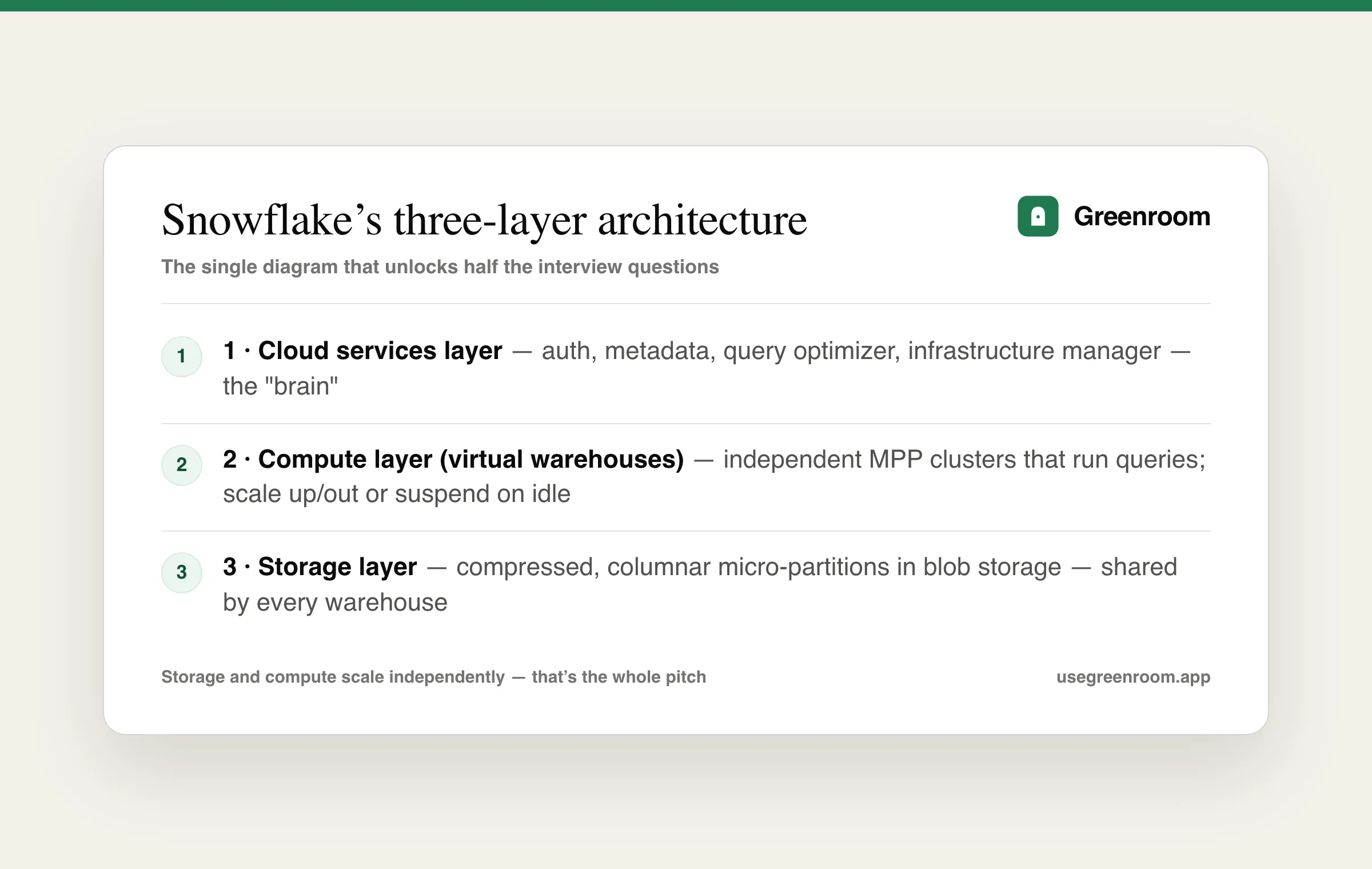
Snowflake runs on a three-layer architecture: a cloud services layer (authentication, the query optimizer, metadata, infrastructure management — the "brain" that never touches your compute bill directly), a compute layer made of independent virtual warehouses that actually execute queries, and a storage layer where all data lives, compressed and columnar, in cloud blob storage (S3, Azure Blob, or GCS depending on the account's cloud). The interview-defining detail: storage and compute are decoupled — you can scale one without touching the other, multiple warehouses can query the same data concurrently with zero contention, and you pay for storage and compute completely separately. Say this cleanly and you've already cleared the first filter question.
Is Snowflake a "true" MPP database — how does that differ from a traditional data warehouse?
Yes — each virtual warehouse is a Massively Parallel Processing (MPP) cluster: a query is split across multiple compute nodes that each process a slice of the data in parallel, then results are combined. The difference from a traditional on-prem warehouse (or shared-everything systems) isn't just "it's parallel" — it's that Snowflake spins up an entirely separate MPP cluster per warehouse, so a heavy batch ETL job on one warehouse can't starve a BI dashboard querying the same tables on another. That isolation-without-data-duplication is the specific thing Snowflake's architecture buys you that older warehouses (Teradata, on-prem Hadoop-based systems) couldn't.
What's the difference between Snowflake and a data lake, or a lakehouse like Databricks?
A data lake stores raw files (often Parquet/CSV in S3) with no built-in query engine or transaction guarantees — you bring your own compute (Spark, Athena). Snowflake is a managed cloud data warehouse: structured storage, ACID transactions, and SQL built in, trading some raw flexibility for massive ease-of-use and near-zero ops. Databricks/lakehouse architectures try to blend both — open table formats (Delta Lake, Iceberg) with warehouse-like guarantees on top of lake storage. In interviews, the honest answer isn't "Snowflake wins" — it's naming the tradeoff: Snowflake for SQL-first analytics teams who want minimal ops, a lakehouse when ML workloads and open-format flexibility matter more than turnkey simplicity. Interviewers ask this specifically to see if you can reason about tradeoffs instead of reciting a vendor's pitch deck.
Virtual warehouses
What is a virtual warehouse, and how does sizing work?
A virtual warehouse is the compute engine that executes queries and loads data — it doesn't store data itself, it just reads from and writes to the shared storage layer. Warehouses come in T-shirt sizes (X-Small through 6X-Large), where each size up doubles the compute (and roughly the credit cost per hour) of the one below it. Because storage is separate, you can resize a warehouse instantly without moving any data, run five differently-sized warehouses against the same tables simultaneously, and auto-suspend a warehouse after a period of inactivity so you stop paying credits the moment nobody's querying.
How do you decide warehouse size and multi-cluster settings for a real workload?
Start small and scale up only when query queuing or slow single-query performance shows you need more power per query — that's vertical scaling (bigger warehouse). If instead many concurrent users are queuing behind each other on the same-size queries, the fix is multi-cluster warehouses, which spin up additional clusters of the same size to absorb concurrency, not make any individual query faster. Confusing these two is the most common wrong answer here: bumping warehouse size to fix a concurrency problem burns credits without fixing queuing, and adding clusters to fix a genuinely slow single query does nothing since each new cluster is the same size as the first.
What's the difference between scaling up and scaling out in Snowflake?
Scaling up means resizing a warehouse to a bigger T-shirt size, which speeds up individual heavy queries by giving each one more compute resources. Scaling out means enabling multi-cluster warehousing, which adds parallel clusters of the same size to handle more concurrent queries without making any single query faster. Interviewers use this pair of terms specifically to test whether you conflate "slow" with "queued" — they're different symptoms with different fixes.
Micro-partitions and clustering
What is a micro-partition, and why does Snowflake use them instead of traditional partitioning?
A micro-partition is a small (50–500MB uncompressed), immutable, columnar chunk of a table that Snowflake creates and manages automatically as data is loaded — there's no manual PARTITION BY clause the way there is in many traditional warehouses. Each micro-partition stores compressed columnar data plus metadata (min/max values, distinct counts) for every column it contains. Because that metadata is indexed, Snowflake can prune micro-partitions that can't possibly contain rows matching a query's filter, without ever reading them off disk — this is the mechanism behind Snowflake's speed on selective queries, and it's fully automatic, which is the detail interviewers are checking you actually understand (not just that Snowflake is "fast").
How does clustering work, and when would you define a clustering key?
By default, micro-partitions are ordered roughly by insertion (load) order. For very large tables where queries commonly filter on a column that doesn't correlate with load order (say, filtering a multi-terabyte events table by customer_id when it's loaded in timestamp order), pruning gets weaker because matching rows are scattered across many micro-partitions. A clustering key tells Snowflake to physically reorganize micro-partitions around that column so pruning stays effective. The nuance interviewers want: clustering isn't free — Snowflake runs background re-clustering that consumes credits — so you only add a clustering key on genuinely huge tables (multi-TB+) with a clear, stable, frequently-filtered column, not by default on every table.
What is query pruning, and how would you diagnose that it's not happening?
Query pruning is Snowflake skipping micro-partitions whose min/max metadata proves they can't contain rows matching a filter — the fewer partitions scanned, the faster and cheaper the query. To diagnose pruning, you'd check the Query Profile in Snowsight and look at "partitions scanned" vs "partitions total" for a table scan step; if scanned is close to total despite a selective filter, pruning isn't kicking in — usually because the filtered column isn't correlated with insertion/clustering order, or the filter uses a function (WHERE DATE(created_at) = ...) that defeats the metadata-based pruning entirely. This is the kind of concrete, tool-specific answer (not just "pruning is good") that separates candidates who've actually opened Snowsight from candidates who've only read the docs.
Time travel, fail-safe, and zero-copy cloning
Explain Time Travel — what problem does it solve, and what are its limits?
Time Travel lets you query, clone, or restore a table's data as it existed at any point within a retention window (1 day by default, up to 90 days on Enterprise+ editions) using AT/BEFORE clauses or UNDROP. It solves the "someone ran an UPDATE without a WHERE clause" class of incident without needing a separate backup restore process — you just query the table as of a minute ago and compare, or UNDROP a table dropped by mistake. The limit interviewers want you to name: Time Travel only covers the retention window you've configured, and it isn't free — retained historical data consumes storage, which is why most teams don't blindly max out retention on every table.
What is Fail-safe, and how is it different from Time Travel?
Fail-safe is a non-configurable 7-day period that starts automatically after a table's Time Travel window ends, during which Snowflake — not you — can recover data, strictly for disaster-recovery scenarios (not routine "oops" undos). The distinction interviewers listen for: Time Travel is self-service (any authorized user can query/restore it directly with SQL); Fail-safe is Snowflake-support-only, exists purely as a last-resort safety net, and you can't disable it or query it yourself. Confusing the two — thinking you can SELECT ... AT into the Fail-safe period — is a very common wrong answer.
What is zero-copy cloning, and why does it matter for cost?
CREATE TABLE ... CLONE creates an instant, full copy of a table, schema, or entire database that shares the same underlying micro-partitions as the source — no data is physically duplicated at clone time, so cloning a multi-terabyte table takes seconds and costs nothing extra in storage. Storage cost only appears later, and only for the delta: as either the clone or the original is modified, Snowflake writes new micro-partitions for the changed data while unchanged partitions stay shared. This is why zero-copy cloning is the standard pattern for spinning up a full production-data-sized dev or staging environment on demand, something that would be prohibitively slow and expensive with a traditional physical copy.
Snowpipe and data loading
What is Snowpipe, and how does it differ from a scheduled COPY INTO?
COPY INTO is a batch load you run manually or on a schedule (via a task) to bulk-load files already sitting in a stage. Snowpipe is Snowflake's continuous, event-driven loading service — as new files land in cloud storage, a notification (S3 event, Azure Event Grid, or a Snowpipe REST call) triggers Snowpipe to load them automatically, typically within seconds to a couple of minutes, using serverless compute billed per-second rather than a warehouse you manage and pay for even when idle. The tradeoff interviewers want named: Snowpipe is ideal for continuous micro-batch ingestion (streaming-like latency without running Kafka/Spark yourself), but for a predictable nightly bulk load of a huge file, a scheduled COPY INTO on a right-sized warehouse is often more cost-predictable.
How would you design an ingestion pipeline from S3 into Snowflake for near-real-time analytics?
A common, interview-safe answer: land files in an S3 bucket, configure an external stage pointing at that bucket, set up Snowpipe with an S3 event notification so new files auto-ingest into a raw landing table within seconds of arrival, then use Streams (which track row-level changes/CDC on a table) combined with Tasks (Snowflake's built-in scheduler) to incrementally transform raw data into cleaned, modeled tables — effectively a lightweight ELT pipeline entirely inside Snowflake, without standing up Airflow or dbt Cloud if the transformations are simple enough. For more complex transformation logic, swap the Tasks step for dbt running on a schedule against Snowflake. Naming Streams+Tasks specifically (not just "then I transform it") is the detail that shows real hands-on experience.
Roles, RBAC, and security
How does Snowflake's role-based access control (RBAC) model work?
Access in Snowflake is granted to roles, not directly to users — users are then granted one or more roles, and roles can be granted to other roles, forming a hierarchy. Snowflake ships built-in system roles (ACCOUNTADMIN at the top, SECURITYADMIN, SYSADMIN, PUBLIC) but real deployments build custom functional roles (e.g., ANALYST, DATA_ENGINEER) that get granted specific object privileges, then assign those functional roles to users — rather than handing out powerful built-in roles broadly. The principle interviewers are checking for: least-privilege by design, with ACCOUNTADMIN reserved for a small number of admins, not the default working role for anyone.
What's the difference between an object owner's privileges and privileges granted separately?
Whoever creates an object (a table, view, warehouse) automatically becomes its owner, and ownership carries full control over that object — grant, revoke, drop — independent of any other privileges explicitly granted. This matters operationally: if a person leaves the company and their role is dropped without first transferring ownership of objects they created, those objects can become awkward to manage. Interviewers listening for maturity want to hear that you'd typically create objects under a shared functional role (not a personal user) precisely to avoid this.
How do you secure sensitive columns (PII) in Snowflake?
Snowflake's native tools here are dynamic data masking (a masking policy applied to a column that shows real data to authorized roles and a masked/redacted value to everyone else, evaluated at query time) and row access policies (restricting which rows a role can see, e.g., a sales rep only seeing their own region's rows). Both are defined once at the object level and enforced automatically for every query against it, so you don't need to duplicate masking logic across every downstream view or BI tool. Naming both — not just "we'd encrypt it" — is the answer that shows Snowflake-specific depth rather than generic security knowledge.
Query optimization and cost management
A query that used to run in seconds is now slow. How do you debug it in Snowflake?
Open the Query Profile in Snowsight first — it shows the actual execution plan as a graph, with the most expensive operator highlighted and the percentage of total time each step consumed. Check, in order: is pruning working (partitions scanned vs total, covered above), is there a large "Bytes spilled to local/remote storage" number (meaning the warehouse ran out of memory for a step, usually a large join or sort, and spilled to disk — this is a common, very fixable cause of sudden slowness), and has data volume simply grown since the query was last fast. The interview signal here isn't reciting causes from memory — it's demonstrating you'd actually open the tool and read it, in that order.
What causes "spilling," and how do you fix it?
Spilling happens when an operation (a large join, sort, or aggregation) needs more memory than the warehouse's compute nodes have available, so Snowflake writes intermediate results to local disk, or in worse cases to remote cloud storage, which is dramatically slower than in-memory execution. The direct fix is a bigger warehouse (more memory per node), but the cheaper fix — worth naming first in an interview — is reducing the data volume the spilling operator actually has to handle: filter earlier in the query, avoid unnecessary wide joins, and pre-aggregate before joining where possible.
How do you control Snowflake spend without hurting performance?
The standard levers, in the order most teams reach for them: aggressive auto-suspend (60 seconds or less on warehouses with bursty usage, so idle time never burns credits), resource monitors (hard credit caps per warehouse or account that can suspend a warehouse or alert before a runaway job blows the budget), right-sizing warehouses per workload instead of one oversized shared warehouse for everything, and separating warehouses by workload (a small warehouse for BI dashboards, a larger one for nightly ETL) so a heavy batch job doesn't force everyone onto bigger, more expensive compute. The mature answer also names the tradeoff: over-aggressive suspend/resume adds resume latency (a few seconds of cold-start) to the first query after idle time, which is the actual cost of saving those credits.
How Snowflake interview prep is different from a leetcode grind
Most Snowflake interview prep looks like the same three moves: skim a GeeksforGeeks-style question dump, read the official Snowflake documentation cover to cover, or paste "give me Snowflake interview questions" into ChatGPT and read the output silently at your desk. All three build recognition — you'll nod along at "micro-partition" in the real interview — but none of them build the thing the interview actually tests: explaining a tradeoff out loud, live, while someone asks "okay but what if the table's 10TB" right after your first sentence.
I built Greenroom after living the other side of that gap — I used to freeze in interviews myself, not because I didn't know the material, but because I'd never once said it out loud under real pressure before the interview that counted. Ari, Greenroom's AI interviewer, runs spoken Snowflake and data engineering mock interviews, asks the kind of follow-up a real panel would ("you said clustering key — when would you not add one?"), and scores your answer on clarity and structure, not just whether you used the right vocabulary. It's free to start, and it's the difference between recognizing an answer and being able to produce one when someone's actually watching you think.
Pair it with the broader data engineer interview questions guide if Snowflake is one part of a wider data-platform interview loop, or SQL interview questions if the round leans heavier on raw SQL than Snowflake-specific architecture. If you're prepping for a specific company's data engineering loop, the Google data engineer and Amazon data engineer guides cover what those particular loops emphasize.
Frequently asked questions
What Snowflake interview questions come up most for data engineering roles?
The most common are explaining Snowflake's three-layer architecture (storage, compute, cloud services), how virtual warehouses and multi-cluster scaling work, micro-partitions and query pruning, the difference between Time Travel and Fail-safe, zero-copy cloning, Snowpipe versus scheduled loading, RBAC and dynamic data masking, and diagnosing a slow query using the Query Profile.
Is Snowflake hard to learn for someone who already knows SQL?
Not particularly — Snowflake's query language is standard ANSI SQL, so the SQL itself isn't the hard part. The learning curve is in the Snowflake-specific architecture concepts (virtual warehouses, micro-partitions, Streams and Tasks, zero-copy cloning) that don't map directly onto a traditional on-prem or open-source warehouse, and that's exactly what interview questions probe, since anyone can write a SELECT statement.
What's the difference between Time Travel and Fail-safe in Snowflake?
Time Travel is a configurable (1–90 day) window during which you can self-service query, clone, or restore historical table data using SQL (AT, BEFORE, UNDROP). Fail-safe is a fixed 7-day period that starts automatically after Time Travel ends, exists only for Snowflake-support-assisted disaster recovery, and can't be queried or configured by users directly.
How do you optimize Snowflake costs without hurting query performance?
Set aggressive auto-suspend timeouts on warehouses so idle time doesn't burn credits, use resource monitors to cap runaway spend, right-size warehouses per workload instead of sharing one oversized warehouse across every job, and separate warehouses by workload type (BI queries vs nightly ETL) so a heavy batch job doesn't force everyone onto more expensive shared compute.
Do I need to know Snowpipe and Streams/Tasks for a Snowflake interview?
If the role involves data ingestion or pipeline design (most data engineering roles do), yes — expect at least one question on how you'd design a near-real-time ingestion pipeline, and Snowpipe plus Streams and Tasks is the standard, interview-safe answer for building one entirely inside Snowflake without extra orchestration tools.
How should I practice for the verbal, whiteboard-style part of a Snowflake interview?
Practice explaining the architecture and tradeoffs out loud, not just recognizing the terms on a page — interviewers follow up on your first answer, so reading the documentation silently doesn't rehearse the actual skill being tested. A spoken mock interview that asks realistic follow-up questions is the closest rehearsal to the real thing.
Working with the wider stack? The dbt interview questions guide covers the transformation layer that most often runs on Snowflake, the data modeling interview questions guide covers the schema design underneath, and the Databricks interview questions guide covers the closest lakehouse alternative.