"My job takes six hours," the candidate said. "So I cached the DataFrame." The interviewer nodded slowly, in the way that means a follow-up is coming. "And did it get faster?" "...No." "Right. Why not?" There followed one of those silences you can hear the laptop fan through.
That exchange is most PySpark interview questions in miniature. Almost every candidate can write a groupBy. What separates people is whether they know why a job is slow — and "I added .cache()" is the answer of someone who has read about Spark rather than debugged it at 2am. This guide covers the questions that actually get asked, the code, and the follow-up waiting behind each one.
What PySpark interviews actually test
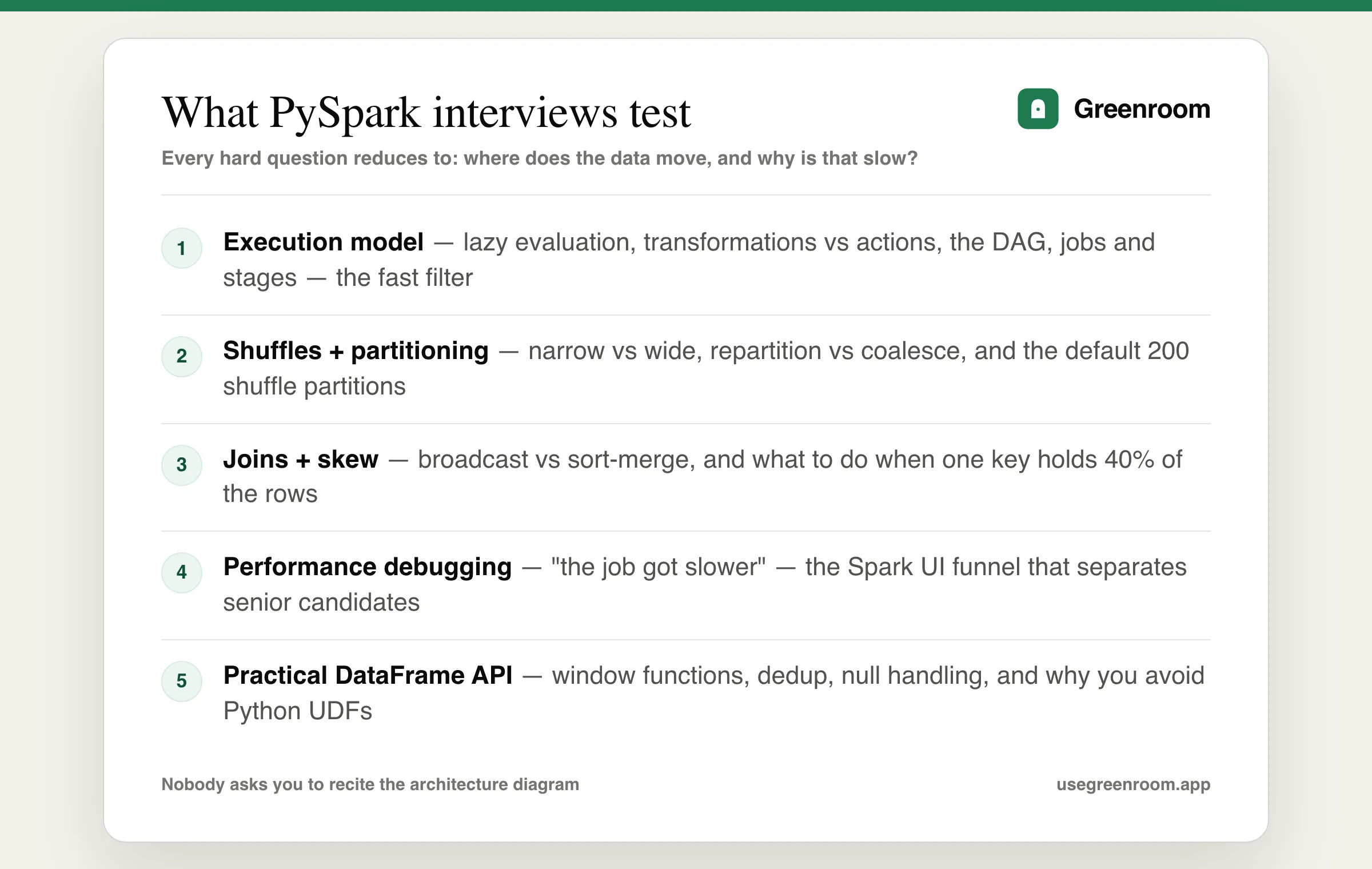
Whether you are interviewing for a data engineer role at a product company or a consultancy, the PySpark interview questions cluster into five bands, and they are not equally weighted:
- Execution model — lazy evaluation, transformations vs actions, the DAG, jobs/stages/tasks. Cheap to ask, and it filters fast.
- Shuffles and partitioning — narrow vs wide transformations, why a shuffle is expensive, how many partitions you end up with. This is the heart of it.
- Joins — broadcast vs sort-merge, and what to do about skew. Asked in almost every loop.
- Performance debugging — a job is slow, here is the Spark UI, what do you look at? The senior-level differentiator.
- Practical API — window functions, handling nulls, reading and writing partitioned data, UDF avoidance.
Notice what is missing: nobody asks you to recite the Spark architecture diagram. They ask what happens to your job when one customer has 40% of the rows.
Transformations vs actions and lazy evaluation
The opening question in most loops. Transformations (select, filter, groupBy, join, withColumn) are lazy — they build a plan and execute nothing. Actions (count, collect, show, write, take) trigger the plan to run.
The good answer adds the why: laziness lets Catalyst see the whole chain before executing, so it can push filters down to the scan, prune columns, and collapse operations. A filter you write last may run first. That is also why a bug can appear on the line that has an action rather than the line with the mistake — a detail that only comes from having debugged it.
The classic follow-up: narrow vs wide transformations. Narrow (filter, map, select) need only the data already in the partition. Wide (groupBy, join, distinct, orderBy, repartition) require data movement across the network — a shuffle — and a shuffle is where your job goes to die. Stage boundaries in the Spark UI are exactly the shuffle points.
Shuffles, partitioning and repartition vs coalesce
Expect a direct question on repartition versus coalesce. The honest answer:
repartition(n)— full shuffle, can increase or decrease partitions, produces evenly sized partitions. Expensive, but it fixes imbalance.coalesce(n)— no full shuffle, can only decrease, merges existing partitions and therefore may leave you with uneven ones. Cheap, but it will not rescue a skewed job.- The real-world use:
coalescebefore writing to cut down small files;repartitionwhen the partitions themselves are lopsided or before an expensive wide operation.
The follow-up almost nobody prepares for: "you coalesced to 1 to write a single file and the job got slower — why?" Because coalesce(1) collapses the upstream parallelism too, so the entire computation before the write ends up on one task. The fix is repartition(1), which shuffles but keeps the upstream stages parallel, or writing multiple files and merging outside Spark.
Know spark.sql.shuffle.partitions — the default of 200 is the single most common cause of "my small job takes forever" (200 tiny tasks with all their overhead) and of "my huge job spills" (200 enormous ones). Adaptive Query Execution now coalesces shuffle partitions at runtime, which is worth naming, but knowing the knob still matters.
Broadcast joins and handling data skew
The most reliably asked PySpark join interview question is: you are joining a 2 TB fact table to a 40 MB dimension table, what happens and what would you do?
The answer is a broadcast join — ship the small side to every executor and join locally, avoiding the shuffle entirely. Spark does this automatically under spark.sql.autoBroadcastJoinThreshold (10 MB by default), and you can force it:
from pyspark.sql import functions as F

# Force the small side to broadcast instead of a sort-merge join
enriched = fact_df.join(
    F.broadcast(dim_df),
    on="merchant_id",
    how="left",
)
Then the skew question, which is where senior candidates separate themselves. If one merchant_id holds 40% of the rows, one task gets 40% of the work, and your job is as slow as that single straggler — the Spark UI shows 199 tasks finished and one still running. The standard fix is salting: split the hot key across N buckets on both sides.
from pyspark.sql import functions as F

SALT_N = 16

# 1. Add a random salt to the skewed (large) side
fact_salted = fact_df.withColumn(
    "salt", (F.rand() * SALT_N).cast("int")
)

# 2. Explode the small side once per salt value
dim_salted = (dim_df
    .withColumn("salt", F.explode(F.array(*[F.lit(i) for i in range(SALT_N)]))
)

# 3. Join on the composite key — the hot key is now spread over 16 tasks
result = (fact_salted
    .join(dim_salted, on=["merchant_id", "salt"], how="left")
    .drop("salt")
)
Say the cheaper options first, though — it reads far better than jumping to salting. In order: is Adaptive Query Execution on (spark.sql.adaptive.skewJoin.enabled handles many skew cases automatically now)? Can the hot key be broadcast? Can you filter it out and process it separately? Only then salt. Interviewers notice when you reach for the complicated answer first.
Caching, persistence and the question from the intro
Back to the candidate who cached and got nothing. cache() is persist(MEMORY_AND_DISK), and it only pays off when a DataFrame is used more than once. In a linear pipeline — read, transform, write — caching adds the cost of materialising and stores something nobody reads again. It can even make things worse by evicting other blocks or spilling to disk.
The complete answer names when caching does help: a DataFrame branched into several outputs, an iterative algorithm, or a small lookup reused across joins. And it names the alternative — if the expensive part is recomputation across separate jobs, write the intermediate result to Parquet or a Delta table rather than caching it. Also mention unpersist(), because someone will ask.
The performance debugging question
For mid and senior roles the round often ends with an open one: "a job that used to take 20 minutes now takes 3 hours. Walk me through what you check." There is a right shape to this answer, and it is a funnel:
- Did the data change? Volume spike, a new skewed key, or a schema change that broke a filter's pushdown. Check input row counts first — it is the most common cause and the cheapest to check.
- Spark UI, stages tab. Which stage is slow? One long task among many finished ones means skew; all tasks uniformly slow means a resource or volume problem.
- Shuffle read/write sizes. Huge shuffle means a join or aggregation that should be broadcast, or partitioning that no longer matches the query.
- Spill to disk. Visible in the UI; means partitions are too big — raise shuffle partitions or repartition.
- Small files. Thousands of tiny input files means the driver spends its life listing them. Compact upstream.
- Only then, config. Executor memory, cores, AQE settings. Candidates who open here — "I'd increase executor memory" — sound like they are guessing, because they are.
Our data engineer interview questions guide covers the surrounding pipeline material, and the Python interview questions guide covers the language layer these rounds assume.
Practical API questions: windows, UDFs and nulls
The hands-on portion is usually a business problem over a DataFrame. Window functions come up constantly — deduplication by keeping the latest row per key is close to universal:
from pyspark.sql import functions as F, Window

w = Window.partitionBy("payment_id").orderBy(F.col("event_ts").desc())

latest = (events_df
    .withColumn("rn", F.row_number().over(w))
    .filter(F.col("rn") == 1)
    .drop("rn")
)
Expect the follow-up about whether a window without a partitionBy is dangerous — it is, because it moves every row into a single partition.
On UDFs, the expected answer is: avoid them. A Python UDF breaks Spark's JVM execution, serialises every row across the Python boundary, and is invisible to Catalyst — so no predicate pushdown, no optimisation. Reach for built-in functions first, then pandas_udf (vectorised, Arrow-based, far faster), and only then a plain UDF. Saying "I'd check whether a built-in already does it" is the answer they want.
On nulls, know that count(col) skips nulls while count(*) does not, that null != null in a join condition drops rows silently, and that coalesce() the SQL function is a completely different thing from the coalesce() partition method — an ambiguity interviewers enjoy.
Udemy courses, the Spark docs, LeetCode, ChatGPT — where each fits
- The official Apache Spark documentation — the SQL performance-tuning page and the programming guide are genuinely the best free source, and more current than most courses.
- Learning Spark (2nd ed.) and Spark: The Definitive Guide — the right depth for the execution-model questions. The former is more current on DataFrames and AQE.
- Udemy and YouTube courses — good for getting productive, weak for interviews, because they teach the API and skip the debugging that the hard questions are about.
- LeetCode — near-useless here. This is not an algorithms round.
- StrataScratch / DataLemur — useful for the SQL-shaped half, since much of PySpark interviewing is SQL logic in a different syntax.
- Actually running a job — the highest-yield item on this list. Spin up a local Spark session, make a deliberately skewed dataset, and look at the Spark UI. Twenty minutes of that beats a week of reading, because every senior question is about what you saw there.
- ChatGPT — good for generating practice problems and reviewing code. Its limit is the interview reflex: it accepts your first answer instead of asking "and did it get faster?"
- Greenroom — the spoken layer. Ari, the AI interviewer, runs the round out loud and pushes the follow-up when your tuning answer is a list of configs rather than a diagnosis. Fair tradeoff: Ari will not profile your cluster — pair it with the Spark UI.
How to prepare for a PySpark interview
- Week 1: execution model until it is reflexive — transformations vs actions, narrow vs wide, jobs/stages/tasks. Explain each aloud in sixty seconds without notes.
- Week 2: run real jobs locally. Build a skewed dataset, watch one task straggle in the Spark UI, fix it with broadcast and then with salting. You now have a story, which is worth more than the technique.
- Week 3: the DataFrame API on business problems — windows, dedup, incremental loads, partitioned writes. Each one re-explained in ninety seconds without looking.
- Final week: rehearse the "job got slower" funnel aloud, prepare two war stories about performance work in first person, and run two full spoken mocks with follow-ups.
Building the rest of the stack? The Databricks interview questions guide covers Delta Lake and the medallion architecture, the Airflow interview questions guide covers orchestration and backfills, the dbt interview questions guide covers transformation in the warehouse, and the data modeling interview questions guide covers the schema design questions that pair with all of them.
Coming from single-machine work? Our pandas interview questions guide covers where pandas stops being the right tool and why.
Frequently asked questions
What are the most common PySpark interview questions?
The most common questions cover transformations versus actions and lazy evaluation, narrow versus wide transformations and why shuffles are expensive, repartition versus coalesce, broadcast joins and when Spark chooses them, how to detect and fix data skew, when caching actually helps, why Python UDFs should be avoided, and an open-ended question about debugging a job that suddenly got slower.
What is the difference between repartition and coalesce in PySpark?
repartition performs a full shuffle, can increase or decrease the partition count, and produces evenly sized partitions. coalesce avoids a full shuffle, can only decrease the partition count, and merges existing partitions so the results may be uneven. Use coalesce before writing to reduce small files, and repartition when partitions are lopsided or before an expensive wide operation.
How do you handle data skew in PySpark?
Work from cheapest to most complex. First check whether Adaptive Query Execution skew join handling is enabled, since it resolves many cases automatically. Then see whether the small side can be broadcast, or whether the hot key can be filtered out and processed separately. Only then apply salting, which adds a random salt column to the skewed side and explodes the other side once per salt value so the hot key spreads across many tasks.
When should you use cache in PySpark?
Cache only when a DataFrame is used more than once — for example when it branches into several outputs, feeds an iterative algorithm, or serves as a small lookup reused across joins. In a linear read-transform-write pipeline caching adds cost with no benefit and can make the job slower by evicting other blocks or spilling to disk. For expensive results reused across separate jobs, write to Parquet or Delta instead.
Why should you avoid UDFs in PySpark?
A plain Python UDF breaks out of Spark's JVM execution and serialises every row across the Python boundary, which is slow. It is also opaque to the Catalyst optimiser, so you lose predicate pushdown and other optimisations. Prefer built-in Spark SQL functions first, then a vectorised pandas_udf which uses Arrow and is substantially faster, and only fall back to a plain Python UDF when neither works.
Is PySpark still worth learning for data engineering interviews in 2026?
Yes. Spark remains the default distributed processing engine across Databricks, AWS EMR, Google Dataproc and Azure Synapse, and PySpark questions appear in most data engineering loops at product companies and consultancies. Even where teams use SQL-first tools, the underlying engine is often Spark, so the shuffle, partitioning and skew concepts transfer directly to debugging those systems.