It's 11:50am on a Tuesday and you're three minutes into a video round for a "Vue.js Developer (3+ yrs)" role at a Bengaluru product company. The interviewer — camera off, coffee audibly being stirred — opens with what he clearly thinks is a softball: "So, ref or reactive? Which do you use, and why?" You say "ref for primitives, reactive for objects," feel quietly proud, and then he goes, "Cool. So why does my reactive object lose its reactivity the moment I destructure it?" And the coffee-stirring stops, because now he's actually listening.
That follow-up — not the first question, the follow-up — is where most Vue.js interview questions are won or lost. This guide covers the Vue interview questions that actually come up in 2026: Vue 3 reactivity, the Composition API, ref vs reactive, computed vs watch, components, props and events, slots, lifecycle hooks, Pinia state management, Vue Router, and the inevitable "Vue vs React" question — each with a real answer and a note on what the interviewer is really testing. Wherever it helps, there's working code. The goal isn't to help you recite definitions; it's to help you survive the second question.
Vue.js fundamentals
What is Vue.js, and what problem does it solve?
Vue.js is a progressive JavaScript framework for building user interfaces, created by Evan You in 2014 after he wanted "the parts of Angular I liked, without the parts I didn't." The word that matters in that description is progressive — Vue is designed to be adoptable incrementally. You can drop a single <script> tag into an existing server-rendered page and make one widget reactive, or you can go all-in with a full single-page application using Vue Router, Pinia, and a Vite build pipeline. Most frameworks force an all-or-nothing commitment; Vue deliberately lets you scale your usage up as the project demands.
What it actually solves is the same problem React and Angular solve: keeping the DOM in sync with your application state without you hand-writing document.getElementById(...).textContent = ... everywhere. You describe what the UI should look like for a given state, and Vue's reactivity system figures out the minimal DOM updates when that state changes. The interviewer asking this wants to hear "declarative UI + reactivity," not a marketing tagline.
What is the MVVM pattern, and how does Vue implement it?
Vue is loosely based on the MVVM (Model–View–ViewModel) pattern. The Model is your plain data (the reactive state). The View is the DOM the user sees (your template). The ViewModel is the Vue instance sitting between them, providing two-way binding: when the model changes, the view updates automatically; when the user interacts with the view (typing in an input), the model can update too via v-model.
In practice, don't over-index on the academic pattern names. The honest answer is: "Vue gives you reactive state, a template that declaratively binds to that state, and an instance that keeps them in sync — that's MVVM in spirit, though Vue 3's Composition API blurs the strict separation." Interviewers like candidates who know the theory and know not to be religious about it.
What is a Single-File Component (SFC)?
A Single-File Component is a .vue file that co-locates a component's template, logic, and styles in one place, separated into three blocks:
<script setup>
import { ref } from 'vue'
const count = ref(0)
</script>

<template>
  <button @click="count++">Clicked {{ count }} times</button>
</template>

<style scoped>
button { font-weight: 600; }
</style>
The <template> holds the HTML-like markup, <script> holds the JavaScript (here using the <script setup> syntax), and <style> holds CSS. The scoped attribute on the style block is a Vue signature feature: it automatically adds a unique data attribute to elements so the CSS only applies to this component, eliminating the global-CSS-collision problem without you reaching for CSS Modules or a CSS-in-JS library. SFCs are compiled by a build tool (Vite, almost always, in 2026) into optimized JavaScript. Mentioning scoped styles unprompted is a small but real signal that you've actually shipped Vue.
What are directives? Name the ones you use most.
Directives are special attributes prefixed with v- that tell Vue to do something reactive to the DOM. The ones that come up constantly:
v-if/v-else-if/v-else— conditionally render (and remove from the DOM) an element.v-show— toggle visibility viadisplay: none, keeping the element in the DOM.v-for— render a list from an array or object.v-bind(shorthand:) — bind an attribute to a reactive value, e.g.:href="url".v-on(shorthand@) — attach an event listener, e.g.@click="handler".v-model— two-way binding on form inputs.v-html— render raw HTML (and the interviewer's favorite trap — more on that below).
You can also write custom directives for low-level DOM access (autofocus, click-outside, intersection observers). Knowing the shorthands (: and @) and reaching for them naturally is what separates someone who's used Vue from someone who read the docs last night.
What's the difference between v-if and v-show?
This is one of the most common warm-up Vue interview questions, and the answer is about cost trade-offs. v-if actually adds and removes the element from the DOM as the condition changes — so toggling it is expensive (full mount/unmount, child components are destroyed and recreated), but if the condition is rarely true, you pay nothing to render it initially. v-show always renders the element and just toggles display: none — so the initial render cost is always paid, but toggling is cheap (just a style change).
The rule of thumb interviewers want: use v-show for things that toggle often (a dropdown, a tab panel), and v-if for things that are rarely shown or expensive to render (a modal with a heavy child tree, an admin-only panel). The trap follow-up: "can you use v-if and v-for on the same element?" — you can, but you shouldn't, because in Vue 3 v-if has higher priority and the behavior is confusing; wrap the v-for in a <template> and put the v-if there, or filter the list in a computed first.
Vue 3 reactivity
Reactivity is the conceptual heart of Vue, and 2026 interviews dig into it hard — especially since Vue 3 rewrote the system on top of JavaScript Proxies. If you can explain the cycle below clearly, you'll clear most of the reactivity questions a screen can throw at you.
How does Vue 3 reactivity work under the hood?
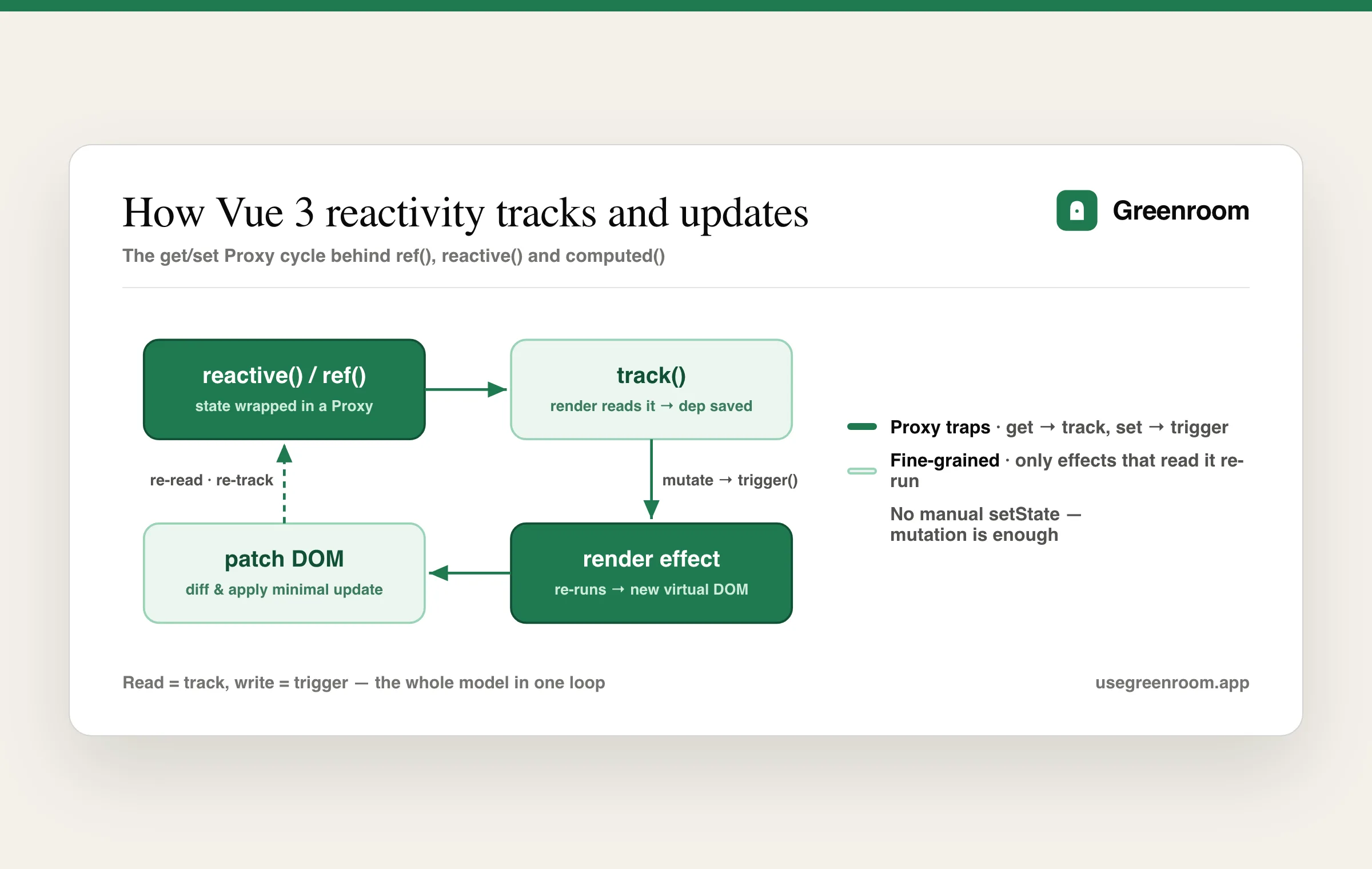
Vue 3 wraps your reactive state in a JavaScript Proxy. A Proxy lets Vue intercept every property get and set. When your component renders, it reads reactive properties — and on each read, the Proxy's get trap runs track(), recording that "this render effect depends on this property." Later, when you mutate a property, the set trap runs trigger(), which re-runs every effect that depended on it. The effect re-running produces a new virtual DOM tree, Vue diffs it against the old one, and patches only the real DOM nodes that changed.
That's the whole loop: read = track, write = trigger. The big upgrade over Vue 2 (which used Object.defineProperty) is that Proxies can detect property additions and deletions and array index changes natively — the Vue 2 limitations that forced you to use Vue.set() are gone. The reason this question matters: a candidate who understands track/trigger can reason about why reactivity sometimes "breaks" (because the connection between a read and an effect got severed), instead of just memorizing the rules.
What's the difference between ref and reactive?
The single most-asked Vue 3 reactivity question. ref() can wrap any value — a primitive (number, string, boolean) or an object — and returns an object with a single .value property that holds it. reactive() only works on objects (and arrays, Maps, Sets) and returns a Proxy of that object directly, with no .value.
import { ref, reactive } from 'vue'

const count = ref(0)          // access via count.value
count.value++

const state = reactive({      // access directly
  count: 0,
  user: { name: 'Asha' }
})
state.count++
Why does ref need .value? Because primitives can't be made reactive on their own — there's nothing to wrap a Proxy around. So ref boxes the value in an object whose .value access is trackable. In <template>, Vue auto-unwraps top-level refs, so you write {{ count }} not {{ count.value }} — but in <script> you always need .value. The pragmatic guidance most teams settle on: prefer ref for almost everything, because it works for all value types and survives the reactivity pitfalls below; reach for reactive only when you have a closely-related cluster of fields and you dislike typing .value.
Why does a reactive object lose reactivity when you destructure it?
This is the killer follow-up from the cold open, and it trips up people who've used Vue for a year. When you destructure a reactive object, you copy the current values of the properties into plain, non-reactive local variables — you've broken the connection to the Proxy:
const state = reactive({ count: 0 })
let { count } = state   // count is now a plain number, NOT reactive
count++                 // mutates the local copy, the UI never updates
The same thing happens if you pass state.count (a primitive) into a function — you pass the value, not a reactive reference. The fixes: use toRefs(state) to destructure into individual refs that stay connected (const { count } = toRefs(state), then use count.value), or just use refs from the start and avoid the whole class of bug. This is exactly the kind of question that separates "I follow Vue tutorials" from "I've debugged a Vue app at 11pm" — and interviewers know it.
What is computed, and how is it different from a method?
A computed property is a reactive, cached derived value:
const firstName = ref('Asha')
const lastName = ref('Rao')
const fullName = computed(() => `${firstName.value} ${lastName.value}`)
The key word is cached: computed only re-evaluates when one of its reactive dependencies changes. If you reference fullName ten times in a template, the function runs once; subsequent reads return the cached result until firstName or lastName changes. A method that returns the same string, by contrast, re-runs every single time the component re-renders for any reason. So computed is the right tool for derived state, and a method is right for something you call on an event (a click handler). The interviewer is checking whether you understand caching — reaching for a method where a computed belongs is a classic performance smell.
computed vs watch — when do you use each?
Both react to changes, but they answer different questions. computed answers "what value should I derive from this state?" — it's declarative, cached, and returns a value with no side effects. watch answers "what should I do when this state changes?" — it's for side effects: firing an API call when a search query changes, saving to localStorage, manually manipulating something outside Vue.
// computed: derive a value
const fullName = computed(() => `${first.value} ${last.value}`)

// watch: run a side effect
watch(searchQuery, async (newQuery) => {
  results.value = await fetchResults(newQuery)
})
The rule of thumb: if you can express it as a computed, use a computed. Reach for watch only when you genuinely need to do something (async, imperative) in response to a change, not just compute something. There's also watchEffect, which runs immediately and automatically tracks whatever reactive values you read inside it — convenient, but it's easy to accidentally track more than you intended, so watch with explicit sources is often clearer in interviews and in real code. A strong answer names the side-effect-vs-derivation distinction explicitly.
What are the reactivity caveats you should know?
Even with Proxies, a few gotchas remain, and naming them unprompted is a strong signal:
- Destructuring breaks reactivity (covered above) — use
toRefs. - Replacing a whole
reactiveobject (state = reactive({...})) breaks it — you've reassigned the local variable, not mutated the Proxy. Mutate properties, or use arefand replace.value. reactiveonly deeply wraps objects — arefholding an object is also deeply reactive, but arefholding a primitive obviously isn't "deep."- Reactivity can be lost across
awaitboundaries in some edge cases — though<script setup>largely handles this.
The meta-point: every caveat comes back to the same root cause — something severed the link between a reactive source and the effect that reads it. If you frame your answer that way, you sound like you understand the system, not the symptom list.
Composition API vs Options API
What is the Composition API, and why was it introduced?
The Composition API is Vue 3's function-based way of authoring components, where you declare reactive state and logic inside a setup() function (or the <script setup> shorthand) using imported functions like ref, computed, and watch. It was introduced to solve two real problems with the Options API in large components:
- Logic fragmentation. In the Options API, one feature's code is scattered across
data,methods,computed, andwatchoptions. A component handling three features has all three features'datamixed together, all three features'methodsmixed together, and so on. With the Composition API you can group all the code for one feature in one place. - Logic reuse. Sharing stateful logic between components used to mean mixins, which silently merge properties and cause naming collisions and "where did this property come from?" confusion. The Composition API replaces mixins with composables — plain functions that return reactive state — which are explicit and have no naming-collision problem.
// Options API
export default {
  data() { return { count: 0 } },
  computed: { double() { return this.count * 2 } },
  methods: { increment() { this.count++ } }
}

// Composition API (<script setup>)
import { ref, computed } from 'vue'
const count = ref(0)
const double = computed(() => count.value * 2)
function increment() { count.value++ }
Should you always use the Composition API now?
No — and saying "yes, always, the Options API is dead" is a small red flag. The honest 2026 answer: the Composition API is the recommended default for new projects and large components, and <script setup> is the standard way to write it. But the Options API is not deprecated, it's perfectly fine for small components, and many large, healthy codebases still use it. Vue's official position is that both are first-class. Some teams find the Options API's rigid structure easier to onboard juniors into, precisely because there's only one place each kind of thing can go.
The mature answer acknowledges the trade-off: Composition API for complex, logic-heavy components and anywhere you want to extract reusable composables; Options API is fine where simplicity and a predictable shape matter more. Interviewers respect "it depends, here's how I decide" far more than dogma.
What is a composable? Give an example.
A composable is a function that encapsulates and reuses stateful logic using the Composition API. By convention it's named useSomething. Here's a useMouse composable that any component can call to get reactive mouse coordinates:
// composables/useMouse.js
import { ref, onMounted, onUnmounted } from 'vue'

export function useMouse() {
  const x = ref(0)
  const y = ref(0)
  function update(e) { x.value = e.pageX; y.value = e.pageY }
  onMounted(() => window.addEventListener('mousemove', update))
  onUnmounted(() => window.removeEventListener('mousemove', update))
  return { x, y }
}
Any component does const { x, y } = useMouse() and gets reactive coordinates plus automatic listener cleanup. This is the Composition API's headline benefit over mixins: the source of x and y is explicit (you can see them come from useMouse), there are no silent merges, and you can call multiple composables without collisions. If you've built even one real composable, mention it — it's concrete proof of Composition API fluency.
Components, props, events and slots
How do components communicate? Explain props and events.
The core rule of Vue component communication is props down, events up — a deliberately one-directional data flow. A parent passes data down to a child via props, and a child notifies the parent up by emitting events. The child never mutates a prop directly (Vue warns you if you try), because that would break the single source of truth and make data flow impossible to trace.
<!-- Child.vue -->
<script setup>
const props = defineProps({ count: Number })
const emit = defineEmits(['increment'])
</script>
<template>
  <button @click="emit('increment')">Count is {{ count }}</button>
</template>

<!-- Parent.vue -->
<script setup>
import { ref } from 'vue'
import Child from './Child.vue'
const count = ref(0)
</script>
<template>
  <Child :count="count" @increment="count++" />
</template>
The parent owns the state, passes it down as :count, and listens for @increment to update it. The interviewer wants to hear "one-way data flow" and "props are read-only in the child" — those two phrases signal you understand why the pattern exists, not just the defineProps/defineEmits syntax.
How does v-model work on a custom component?
v-model is syntactic sugar. On a native input, v-model="x" expands to :value="x" plus @input="x = $event.target.value". On a custom component in Vue 3, v-model="x" expands to :modelValue="x" plus @update:modelValue="x = $event". So to make a component work with v-model, you accept a modelValue prop and emit update:modelValue:
<script setup>
defineProps({ modelValue: String })
const emit = defineEmits(['update:modelValue'])
</script>
<template>
  <input :value="modelValue" @input="emit('update:modelValue', $event.target.value)">
</template>
Vue 3 also supports multiple v-models on one component via named models (v-model:title, v-model:body), which is a great thing to mention — it shows you know the v2-to-v3 evolution (Vue 2 used a single value/input convention and the .sync modifier for extras; Vue 3 unified all of it under v-model:name).
What are slots? Explain scoped slots.
Slots are Vue's content-distribution mechanism — they let a parent inject template content into a child component, the way props.children works in React. A basic slot:
<!-- Card.vue -->
<template>
  <div class="card"><slot>Default content</slot></div>
</template>

<!-- Usage -->
<Card><h2>Injected by the parent</h2></Card>
Named slots let a component expose multiple injection points (<slot name="header">, used via <template #header>). Scoped slots are the powerful part: they let the child pass data back up to the parent's slot content, so the parent can render the child's data however it wants. This is how headless/renderless components work — a <DataTable> can manage fetching and pagination while letting the parent decide how each row looks:
<!-- DataTable exposes each row -->
<slot name="row" :item="item" />

<!-- Parent renders it -->
<template #row="{ item }">
  <strong>{{ item.name }}</strong> — {{ item.email }}
</template>
Scoped slots are a recurring senior-level question because they're the Vue answer to "how do you build a flexible, reusable component library?" Knowing them well signals you've thought about component API design, not just consumption.
What is provide / inject and when would you use it?
provide/inject is Vue's built-in dependency injection for passing data through a deep component tree without prop drilling (threading a prop through five intermediate components that don't use it). An ancestor calls provide('key', value) and any descendant, however deep, calls inject('key') to read it.
// Ancestor
provide('theme', ref('dark'))
// Deep descendant
const theme = inject('theme')
It's the right tool for app-wide or subtree-wide concerns — theme, current user, a localization object — that many components need but you don't want to drill. The caveat interviewers listen for: provide/inject creates an implicit, hard-to-trace coupling, so it's not a replacement for a proper state store when you have shared, mutable application state — that's Pinia's job. The honest answer names both the use case and the limit.
Lifecycle hooks
What are the main lifecycle hooks?
Every Vue component goes through a lifecycle — created, mounted to the DOM, updated when reactive data changes, and finally unmounted. You can run code at each stage. In the Composition API, the hooks are imported functions called inside setup; in the Options API they're options. The ones that matter:
onMounted(Options:mounted) — runs after the component is inserted into the DOM. The place for anything that needs the real DOM: fetching initial data, measuring an element, initializing a third-party library (a chart, a map), adding event listeners.onUpdated(updated) — runs after a reactive change causes a re-render and the DOM is patched. Use sparingly; it's easy to cause infinite loops if you mutate state here.onUnmounted(unmounted) — runs when the component is removed. The place for cleanup: removing event listeners, clearing intervals/timers, closing WebSocket connections. Skipping cleanup here is the #1 cause of memory leaks in Vue apps.onBeforeMount,onBeforeUpdate,onBeforeUnmount— the "before" counterparts, less commonly needed.
import { onMounted, onUnmounted } from 'vue'
onMounted(() => { /* fetch data, init chart */ })
onUnmounted(() => { /* remove listeners, clear timers */ })
Where should you make an API call — onMounted or setup?
A common, slightly tricky question. You can fire an API call directly in setup/<script setup> (it runs before mount), and for client-side apps it often makes no visible difference. But the conventional answer is onMounted for data the component needs after rendering, because: (1) it guarantees the DOM exists if your fetch logic touches it, and (2) it keeps a clear mental model — "side effects that depend on the component being alive go in lifecycle hooks." The nuance for server-side rendering (Nuxt): onMounted does not run on the server, so SSR data fetching needs a different approach (Nuxt's useAsyncData/useFetch). Mentioning the SSR distinction is a senior-level flourish that shows you've thought beyond a toy SPA.
What are nextTick and why do you need it?
Vue batches DOM updates asynchronously for performance — when you change reactive state, the DOM doesn't update synchronously on that line; Vue queues the update and flushes it on the next "tick." So if you change state and then immediately try to read the updated DOM, you'll read the old DOM. nextTick gives you a callback (or awaitable promise) that runs after Vue has flushed the DOM update:
import { nextTick, ref } from 'vue'
const show = ref(false)
async function reveal() {
  show.value = true
  await nextTick()        // wait for the DOM to actually update
  inputEl.value.focus()   // now the element exists and can be focused
}
The classic use case: focusing an input that you just conditionally rendered, or measuring an element after it appears. Knowing why nextTick exists (async batched updates) rather than just that it exists is the difference an interviewer is probing for.
State management with Pinia
What is Pinia, and why did it replace Vuex?
Pinia is the official state-management library for Vue in 2026, and it's the recommended replacement for Vuex. A Pinia store holds shared application state outside the component tree, so distant components can read and update the same data without prop-drilling or event-bubbling through ten layers. Pinia replaced Vuex for several concrete reasons:
- No mutations. Vuex forced a
state → getters → mutations → actionsceremony where you could only change state via "mutations" (sync) called from "actions" (async). Pinia drops mutations entirely — you just change state directly in actions, which is far less boilerplate. - First-class TypeScript. Pinia infers types automatically; Vuex's typing was famously painful.
- No nested modules. Pinia stores are flat and composable — you just define multiple stores and import the ones you need.
- Composition-API native. A Pinia store reads like a composable.
import { defineStore } from 'pinia'
import { ref, computed } from 'vue'

export const useCounterStore = defineStore('counter', () => {
  const count = ref(0)
  const double = computed(() => count.value * 2)
  function increment() { count.value++ }
  return { count, double, increment }
})
A component then does const store = useCounterStore() and uses store.count, store.double, store.increment(). If you've used Redux on the React side, the contrast is worth drawing — Pinia is dramatically less ceremonial, which is itself an interview-worthy comparison.
State, getters, actions — what are they in Pinia?
A Pinia store has three concepts that map cleanly onto component primitives:
- State — the reactive data (
refs in the setup-style store, or astatefunction in the options-style store). The single source of truth. - Getters — derived/computed values from state (
computeds). Cached, like component computed properties. - Actions — methods that change state, including async ones (an API call that then updates state). Unlike Vuex, actions can be async and mutate state directly — no separate mutation step.
The mental model that lands well: "state is data, getters are computed, actions are methods — but shared across the whole app." That one sentence shows you understand Pinia isn't a new paradigm, it's your component primitives hoisted to app scope.
When do you actually need a state store?
A question that separates engineers from cargo-culters. You don't need Pinia for everything — reaching for a global store on day one is over-engineering. Use component state (ref/reactive) for local concerns; use props/emit for parent-child; use provide/inject for passing something down a subtree. Reach for Pinia when you have genuinely shared, mutable state that multiple distant components both read and write — the logged-in user, a shopping cart, app-wide settings, cached server data. The signal interviewers want is judgment: "I start local and lift state up only when sharing demands it," not "I put everything in the store." This mirrors the same decision framework you'd discuss for Redux in a React interview — the principle is framework-agnostic.
Routing and advanced features
How does Vue Router work? What's a route guard?
Vue Router is the official client-side router. It maps URL paths to components and swaps them into a <router-view> outlet without a full page reload — the foundation of a single-page app. You define routes (path → component), navigate with <router-link to="/about"> or programmatically with router.push('/about'), and read params via useRoute().
A navigation guard is a hook that runs before/after a route change, used for things like auth checks and redirects. The most common is beforeEach, a global guard:
router.beforeEach((to, from) => {
  if (to.meta.requiresAuth && !isLoggedIn()) {
    return '/login'   // redirect
  }
})
You can also guard per-route (beforeEnter) or per-component (onBeforeRouteLeave, e.g. "you have unsaved changes, leave anyway?"). Knowing guards signals you've built something with real auth, not just a demo.
What are async components and lazy loading in Vue?
Lazy loading routes is how you keep the initial bundle small in a large Vue app. Instead of importing a route component eagerly, you pass a function that dynamically imports it, so the component's code is split into a separate chunk loaded only when the route is visited:
const routes = [
  { path: '/dashboard', component: () => import('./Dashboard.vue') }
]
That () => import(...) is a dynamic import — the bundler (Vite) automatically code-splits it. For components within a page, defineAsyncComponent does the same thing and pairs with <Suspense> (below) for loading states. This is the Vue equivalent of React.lazy(), and it's the same Core Web Vitals win discussed in the frontend developer interview guide: ship less JavaScript up front, load the rest on demand.
What are Teleport and Suspense?
Two Vue 3 features that show up in "do you know the modern API surface?" questions:
<Teleport>renders a component's markup at a different place in the DOM tree than where it's declared. The canonical use: a modal or tooltip that lives logically inside a deeply-nested component but needs to render at<body>level to escapeoverflow: hiddenandz-indexstacking-context traps.<Teleport to="body"><Modal /></Teleport>keeps the component's logic where it belongs while putting its DOM where it needs to be.<Suspense>is an experimental built-in that lets you show fallback content while async dependencies (async components, orasync setup) resolve — a declarative loading state. It's still marked experimental in 2026, so the safe answer is "I know what it does and that it's not yet stable for production-critical paths."
How do you optimize a Vue app's performance?
A senior question. The honest, layered answer:
- Lazy-load routes and heavy components (
() => import(...)) to shrink the initial bundle. - Use
computedfor derived state so values are cached instead of recomputed every render. - Always key your
v-forlists with a stable unique ID (not the array index) so Vue can reuse DOM nodes correctly across reorders — the same keying bug class that bites React. - Use
v-showfor frequently-toggled elements andv-iffor rarely-shown ones. v-oncefor content that renders once and never changes, andv-memoto skip re-rendering a subtree unless specific dependencies change.- Virtualize long lists (vue-virtual-scroller) so you only render visible rows.
- Avoid making large, deeply-nested objects reactive if you never mutate them —
shallowRef/shallowReactiveormarkRawskip the deep-Proxy overhead.
The signal isn't reciting all seven — it's saying "profile first with Vue DevTools, then fix the actual bottleneck," because premature optimization is its own anti-pattern.
Vue vs React vs Angular — the comparison question
You will be asked some version of "why Vue over React?" — and how you answer reveals whether you actually understand the trade-offs or just picked the framework your bootcamp taught. Be honest; credibility beats hype.
How is Vue different from React?
Both are component-based, both use a virtual DOM, and both have a Composition-style API (Vue's setup, React's hooks) — they've converged a lot. The real differences:
- Reactivity model. Vue tracks dependencies automatically via Proxies — you mutate state and the right things re-render, no dependency arrays. React re-renders the whole component on state change and relies on you to optimize with
useMemo/useCallback/React.memoand to getuseEffectdependency arrays right. Vue's model has fewer footguns for re-renders; React's gives you more explicit control. - Templates vs JSX. Vue uses HTML-based templates with directives (
v-if,v-for); React uses JSX (JavaScript with markup). Templates are more approachable and enable compile-time optimizations; JSX is more flexible because it's just JavaScript. This is largely taste. - Batteries included. Vue ships official, blessed solutions for routing (Vue Router) and state (Pinia). React leaves these to the ecosystem (React Router, Redux/Zustand/Jotai — pick one), which means more freedom and more decision fatigue.
- Scoped styles. Vue's
<style scoped>is built in; React needs CSS Modules, Tailwind, or a CSS-in-JS library.
The mature framing: "React has a bigger job market and ecosystem and more 'one true way' debates; Vue is more approachable, more cohesive out of the box, and its reactivity has fewer re-render footguns. Neither is objectively better — it depends on the team and the project." That answer beats "Vue is better because templates" every time. The deeper React internals show up in our React interview questions guide.
How is Vue different from Angular?
Vue famously started as "Angular's good parts without the weight." Angular is a full, opinionated framework: TypeScript-first, with dependency injection, RxJS observables, and a steeper learning curve, favored by large enterprises and Indian service companies for big internal apps. Vue is lighter and progressive — you adopt as much as you need, and the learning curve is gentler. Angular's reactivity historically used zone.js change detection (now moving to signals); Vue uses Proxy-based reactivity. If you're comparing, the one-liner is: "Angular is a strict, all-in framework with a lot of built-in structure; Vue gives you similar capabilities with less ceremony and a gentler on-ramp." The full Angular picture is in our Angular interview questions guide.
What is Nuxt, and when would you use it?
Nuxt is to Vue what Next.js is to React — a meta-framework that adds server-side rendering (SSR), static site generation (SSG), file-based routing, auto-imports, and a server layer on top of Vue. You reach for Nuxt when you need SEO (server-rendered HTML that crawlers see immediately), faster first-contentful-paint, or a full-stack Vue app with API routes. For a pure internal dashboard behind a login, plain Vue + Vite is fine; for a public-facing marketing or e-commerce site, Nuxt's SSR is usually the right call. The trade-offs mirror the SSR/SSG/ISR discussion in the Next.js interview questions guide.
Security and common gotchas
How does Vue protect against XSS, and where can you still get burned?
By default, Vue escapes all content rendered via text interpolation ({{ }}) and v-bind, so user input can't inject script tags — cross-site scripting (XSS) is prevented out of the box for normal rendering. Where you can still get burned is v-html, which renders raw HTML. Passing user-controlled content into v-html is a direct XSS hole — if a user's "bio" contains <script> or an onerror handler, it executes. The rule: never v-html untrusted content; if you must render user HTML (a rich-text comment), sanitize it first with a library like DOMPurify. Interviewers slip this into security-conscious rounds; knowing the v-html trap is the tell that you think about safety.
What are some classic Vue mistakes you've seen or made?
A behavioral-flavored technical question — they want self-awareness. Strong, real answers:
- Mutating a prop directly in a child instead of emitting an event — breaks one-way data flow and triggers a Vue warning.
- Using the array index as a
:keyinv-for, then getting weird state when the list reorders or items are removed. - Forgetting
.valueon arefin<script>(it auto-unwraps in templates, so people forget it elsewhere). - Destructuring a
reactiveobject and wondering why the UI froze. - Forgetting cleanup in
onUnmounted— leaving timers and listeners running, leaking memory. - Putting everything in a Pinia store when local state would do.
Naming a mistake you actually made, and what you learned, is far more convincing than a sanitized list — that's the behavioral storytelling interviewers reward even in technical rounds.
ref for primitives, reactive for objects." The offer goes to the candidate who can also explain why destructuring breaks reactivity out loud, calmly, when the interviewer pushes.Practise explaining Vue out loud, not just reading answers
Here's the trap with a guide like this: you can read every answer above, nod along, recognize each one on a flashcard — and still freeze when an interviewer says "okay, but why does computed cache and a method doesn't?" and waits. Recognition is not the same skill as production under mild pressure with someone watching you think. The Vue interview is verbal and adaptive — it follows up — so your practice has to be verbal and adaptive too.
Reading answers silently builds false confidence. The fix is to rehearse speaking the explanations, ideally with something that asks the follow-up questions a real interviewer would. That's exactly what Greenroom does: it runs spoken mock interviews for frontend and Vue roles, asks adaptive follow-ups on your real projects and GitHub repos, and gives feedback on how clearly you explained the concept — not just whether you eventually got to the right word. Pair it with how to explain your projects without rambling and coding-interview communication tips, and the JavaScript fundamentals underneath it all in the JavaScript interview questions guide.
Frequently asked questions
What are the most important Vue.js interview questions to prepare?
Prioritize Vue 3 reactivity (how Proxies, track and trigger work), the difference between ref and reactive (and why destructuring breaks reactivity), computed vs watch, the Composition API vs the Options API and when to use each, component communication (props down, events up), slots and scoped slots, lifecycle hooks (especially onMounted and cleanup in onUnmounted), Pinia state management, and the Vue vs React comparison. The follow-up questions on reactivity caveats are where most interviews are actually decided.
Should I learn the Composition API or the Options API for interviews in 2026?
Learn the Composition API with script setup as your default, since it's the recommended style for new projects and most modern codebases and job descriptions assume it. But don't dismiss the Options API — it's not deprecated, it's first-class in Vue, and it's still common in existing codebases. The strongest interview answer shows you know both and can articulate when each fits: Composition API for complex, logic-heavy components and reusable composables; Options API for small components where its predictable structure is an advantage.
What is the difference between ref and reactive in Vue 3?
ref() wraps any value (primitive or object) and you access it via .value in script (it auto-unwraps in templates). reactive() only works on objects/arrays/Maps/Sets and returns a Proxy you access directly with no .value. ref needs .value because primitives can't be made reactive on their own, so they're boxed in a trackable object. Most teams prefer ref for almost everything because it works for all value types and avoids the reactivity pitfalls — notably that destructuring a reactive object breaks its reactivity unless you use toRefs.
Is Vue.js still worth learning in 2026 with React dominating?
Yes. React has the larger job market, but Vue has a strong, stable ecosystem, is heavily used across startups, enterprises, and especially in Asia and Europe, and its gentler learning curve and cohesive official tooling (Vue Router, Pinia, Nuxt) make it productive fast. Many roles list Vue specifically, and knowing it well — including how it differs from React — makes you a stronger, more versatile frontend candidate. The reactivity concepts also transfer: understanding Vue's automatic dependency tracking deepens your grasp of React's explicit model and vice versa.
How do I explain how Vue reactivity works in an interview?
Describe the cycle, not a definition: Vue wraps reactive state in a Proxy; when a component renders it reads properties, and each read runs track() to record that the render depends on that property; when you mutate a property the set trap runs trigger(), which re-runs every effect that depended on it, producing a new virtual DOM that Vue diffs and patches minimally onto the real DOM. Summarize it as read = track, write = trigger. Framing every reactivity gotcha as something severed the link between a read and its effect shows genuine understanding.
How should I practise for a Vue.js interview?
Don't just read questions and answers — practise saying the explanations out loud, because the interview is verbal and follows up. Build at least one real composable and one component with scoped slots so you can speak from experience. Rehearse the high-frequency follow-ups (why computed caches, why destructuring breaks reactivity, computed vs watch) until you can explain them calmly under mild pressure. A spoken mock interview that asks adaptive follow-up questions — like Greenroom — is the closest practice to the real thing, since recognizing an answer on a flashcard is a different skill from producing it live.