The interview was going fine until the hiring manager shared her screen, pointed at your sample report, and asked: "Why doesn't the total row equal the sum of the rows above it?" You know the number is right. You've seen this a hundred times. And you have absolutely no words for it — because "it just… does that" is not an answer that gets offers.
Welcome to DAX interview questions — where every question, from the easiest to the nastiest, is secretly the same question: do you actually understand evaluation context? This guide covers the Power BI DAX interview questions that come up in analyst and BI developer rounds — measures vs calculated columns, filter context, CALCULATE, iterators and time intelligence — with answers you can say out loud. (For the broader tool round, see our Power BI interview questions guide.)
Measures vs calculated columns
The warm-up question, and a real filter. A calculated column is computed row by row at data refresh, stored in the model, and consumes memory — use it when you need the value on each row (to slice by, or as a relationship key). A measure is computed at query time, in the filter context of wherever it's displayed, and stores nothing — use it for every aggregation. The interview follow-up: "why is a Profit calculated column on a 100-million-row table a bad idea?" Because you've stored 100 million values that a one-line measure computes on demand — and the column won't respond to slicers the way people expect.
Row context vs filter context in DAX
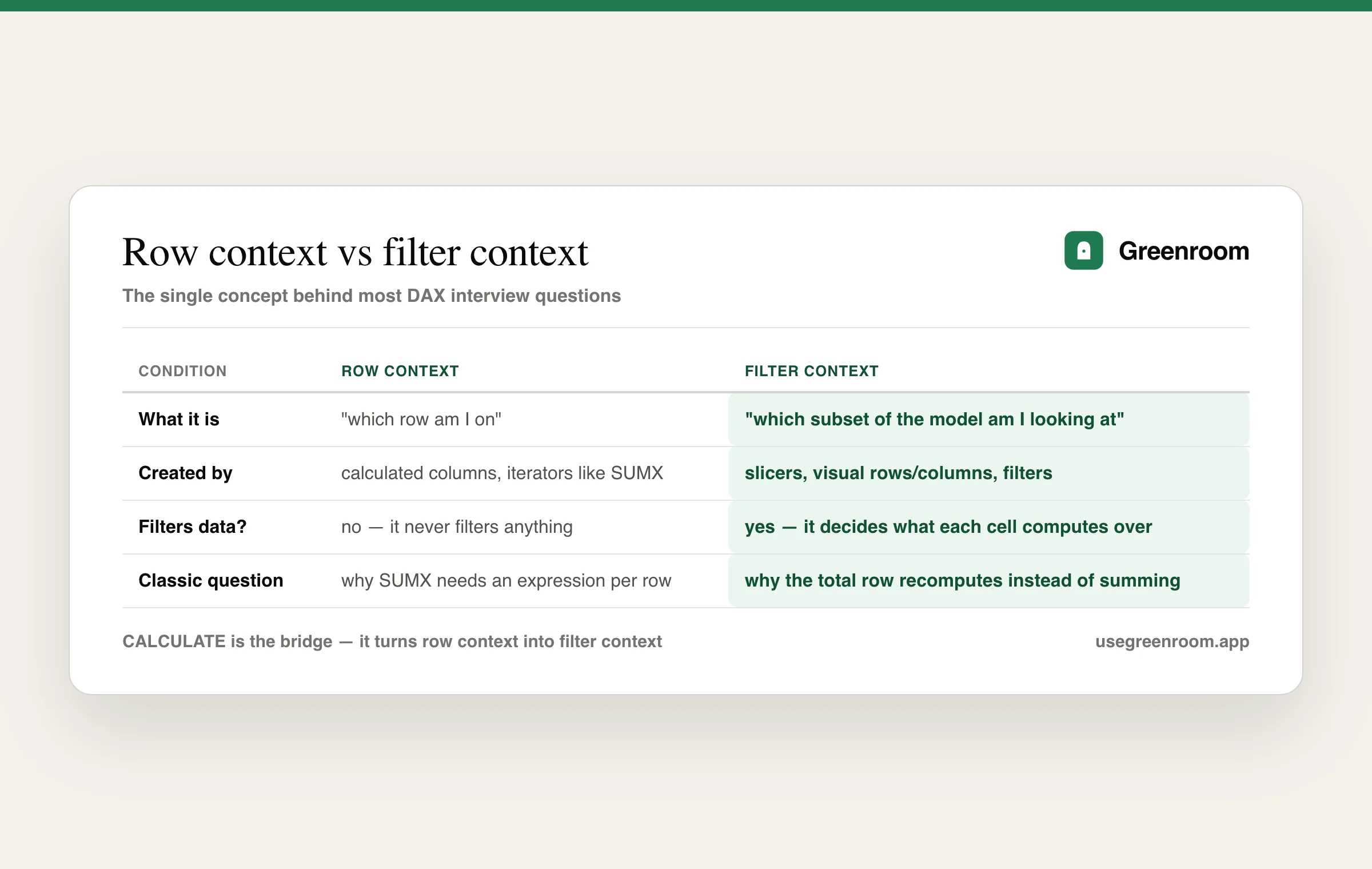
This is the heart of the language, and of the interview. Row context is "which row am I on" — it exists in calculated columns and inside iterators like SUMX, and it does not filter anything. Filter context is "which subset of the model am I looking at" — it comes from slicers, rows/columns of a visual, and filters, and it's what makes the same measure show different values in every cell of a matrix. The total-row mystery from the opening? The total cell has a different filter context (no product filter), so a ratio measure doesn't sum — it recomputes. Say that sentence in an interview and you've passed the question most candidates fail.
How does CALCULATE work? (the most asked DAX interview question)
CALCULATE is the only function that modifies filter context — it evaluates an expression under filters you add, remove, or replace. It also performs context transition: inside a row context, it turns the current row into an equivalent filter context (this is the answer to "what happens when a measure is referenced inside SUMX"). The interview classic — percent of total that ignores a slicer:
-- share of ALL regions, even when a Region slicer is active
Region % of Total =
VAR AllRegionSales =
    CALCULATE ( SUM ( Sales[Amount] ), ALL ( Sales[Region] ) )
RETURN
    DIVIDE ( SUM ( Sales[Amount] ), AllRegionSales )
Bonus points for mentioning DIVIDE over the division operator (handles divide-by-zero) and VAR for readability and single evaluation.
Rapid-fire DAX questions and answers
ALL vs ALLEXCEPT vs ALLSELECTED — when do you use each?
ALL removes filters from a table or column (grand totals, % of total). ALLEXCEPT removes all filters except the columns you name (subtotals by category). ALLSELECTED removes filters from inside the visual but respects slicers — the one to use when "% of total" should mean "% of what the user has selected."
SUM vs SUMX — what's the difference?
SUM aggregates a single column. SUMX is an iterator: it walks a table row by row (creating row context), evaluates an expression per row, then sums. SUMX ( Sales, Sales[Qty] * Sales[Price] ) is the canonical example — you can't SUM a multiplication that doesn't exist as a column.
RELATED vs RELATEDTABLE?
RELATED fetches a value from the one side of a relationship into row context on the many side (e.g., pulling Category into Sales). RELATEDTABLE goes the other way — from the one side, it returns the filtered set of related many-side rows.
What are the common time intelligence functions?
TOTALYTD, SAMEPERIODLASTYEAR, DATEADD, DATESINPERIOD — and the trap the interviewer is fishing for: they all require a proper date dimension table marked as a date table, with contiguous dates. "My YTD measure returns blank" is almost always a broken or missing date table.
Sales LY  = CALCULATE ( [Total Sales], SAMEPERIODLASTYEAR ( 'Date'[Date] ) )
Sales YTD = TOTALYTD ( [Total Sales], 'Date'[Date] )
Why use variables (VAR) in DAX?
Readability, debugging (return an intermediate step), and performance — a VAR is evaluated once, where repeating the expression may evaluate it repeatedly. Subtlety worth saying out loud: variables are evaluated in the context where they're defined, not where they're used — a favourite trick question.
Scenario-based DAX questions
Senior rounds move from syntax to scenarios: "top 5 products with everything else grouped as 'Others'" (TOPN + EXCEPT or a disconnected table), "same-store sales — only stores open in both years" (CALCULATE with an INTERSECT of store sets), "running total that resets each fiscal year" (DATESYTD with a fiscal year-end parameter). You won't be asked to type these perfectly — you'll be asked to talk through the approach, which is exactly the skill a question dump doesn't build.
How to prepare for a DAX interview
For depth, the canonical source is SQLBI (Marco Russo and Alberto Ferrari's work, including dax.guide) — no serious Power BI candidate should skip it. GeeksforGeeks-style question dumps are fine for coverage but train silent recognition, not spoken explanation — and DAX rounds are conducted at a shared screen, out loud, with follow-ups ("okay, but what if the slicer is on a different table?"). That gap — knowing it versus saying it — is why I built Greenroom: Ari, the AI interviewer, runs spoken mock rounds for data and analyst roles and pushes follow-ups until your explanation actually holds. Pair this guide with our SQL interview questions — nearly every DAX round has a SQL sibling.
Frequently asked questions
What are the most common DAX interview questions?
The most common DAX interview questions are: the difference between measures and calculated columns, row context vs filter context, how CALCULATE modifies filter context, ALL vs ALLEXCEPT vs ALLSELECTED, SUM vs SUMX iterators, RELATED vs RELATEDTABLE, time intelligence functions like TOTALYTD and SAMEPERIODLASTYEAR, why variables (VAR) matter, and scenario questions like percent-of-total that ignores a slicer.
What is the difference between a measure and a calculated column in Power BI?
A calculated column is computed row by row at data refresh, stored in the model and consumes memory — use it when you need a value on each row to slice or relate by. A measure is computed at query time in the filter context of the visual and stores nothing — use it for aggregations. Putting aggregatable logic in calculated columns on large tables is the classic mistake interviewers probe.
What is filter context in DAX?
Filter context is the set of filters applied to the data model when an expression evaluates — coming from slicers, visual rows and columns, and report filters. It's why the same measure returns a different value in every cell of a matrix, and why a total row recomputes rather than summing the rows above it. Row context, by contrast, is the current row inside a calculated column or iterator, and does not filter anything.
How does the CALCULATE function work in DAX?
CALCULATE evaluates an expression under a modified filter context — adding, replacing or removing filters (for example, CALCULATE(SUM(Sales[Amount]), ALL(Sales[Region])) computes sales ignoring any Region filter). It also performs context transition: when used within a row context, it converts the current row into a filter context. It's the most important — and most asked — function in the language.
Are DAX questions asked in Power BI interviews for freshers?
Yes, but at a fundamentals level: measures vs calculated columns, what filter context is, basic CALCULATE usage, and a simple time-intelligence measure like YTD sales. Freshers aren't expected to write complex DAX live, but they are expected to explain the concepts clearly out loud — reciting a memorized definition without being able to answer one follow-up is the most common failure.
How do I practice DAX for interviews?
Build one small model (Sales + Date + Product) and write every classic measure yourself: % of total with ALL, YTD, same period last year, SUMX-based margin, and a TOPN scenario. Study SQLBI and dax.guide for correct mental models. Then practice explaining filter context and CALCULATE out loud with follow-up questions — DAX rounds are spoken, and verbal fluency is what separates candidates with identical knowledge.